The Amazing Race: The Irony of Halloween

I decided to watch the most recent episode of The Amazing Race after a night of walking the neighborhood streets with my six-year-old in search of the house with the best candy.  The more I watched the show in hopes of finding an online safety, security, or privacy lesson, the more I was distracted by my son sitting on the carpet, still in full Halloween gear, sorting through his loot.  As I watched him, watched the show, and watched him again, it occurred to me the dramatic irony of Halloween.

Every day we try to teach our kids to navigate life safely, securely, conscious of how we impact others, and aware of the reputation that will precede us wherever we go.  We remind our kids not to take candy from strangers, to be truthful to who we are, to respect those around us, and to be honest about who we are.  I’ve written many articles in which I have tried to highlight what we must teach our kids about staying safe online.  We hope that our kids will understand that the Internet is like the real world – full of the good and the bad – and we hope they will live in the good, avoid the bad, and stay away from the scary.

Then comes Halloween.  We tell our kids to dress up like someone else and do it really well so no one can figure out who is behind the mask.  We then take them out into the world and ask them to ring the bell on houses filled with strangers and ask for candy.  And when they are too scared to go up to a house that is particularly scary, we tell them to suck it up and get up there, that it’s no big deal.  In fact, we feel as though we must push them forward into the scary situation that lies before them, despite what we might have learned about in articles like mine from last week.

And herein lies an opportunity to think about how similar what we do on Halloween is to what many parents will do or not do online.  It is easy to feel a sense of comfort when your child sits at home in front of a computer exploring the world.  They are at home after all.  The reality is that they are exploring the world and need all the guidance we can give them and that we provide to them daily in their offline lives…well, except on Halloween.

So next time your child goes online, ask yourself, “Are they going out trick or treating?”

Halloween Help: Gadgets, Apps to Keep Your Kids Safer

We’re all gearing up for Halloween treats. As kids travel around the neighborhoods for Halloween this year, dressed in costumes and grabbing candy, parents are left wondering about their safety.   Thanks to valuable gadgets, new and old, and a few home-grown safety tips, you can spend time passing out candy instead of worrying this Halloween

Devices and applications that can track our children and help to keep them safe are multiplying by the year.  We took the guesswork out of the search and have compiled a list of some helpful, and easy, gadgets to help keep your child safe.

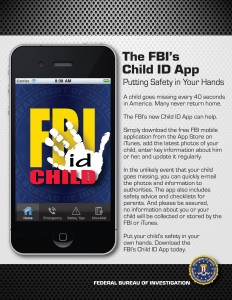
Free FBI app  The FBI app is free app that’s supposed to provide a convenient location to electronically store photos and vital information about your children so that it’s immediately available if you need it.

Google Latitude   Parents can type in their children’s cell number into Google Latitude to find out where they are.

Temporary tattoos   Tattoos for children that has their parents’ contact information.

Backpacks  Backpacks that have alarms built into them can be used for trick or treating, school, sleep overs, hiking, camping, etc.

Amber Alert and My Child ID offer Child ID Kit

Smart Phone GPS  Different GPS locators offered by different service providers and different smart phone platforms give families a way to keep each other safe by turning their cell phones into safety devices.

•  Life360  Life360 enables families to see where their loved ones are located, when they need help and what the threats might be around them.

•  Verizon Wireless Offers family locator service.

•  Blackberry e-mobile family locator

•  AT&T – FamilyMap service.

•  Android Market – Family Locator.

Have a great Halloween.  Trick or Treat safely.

The Amazing Race: The Buddy System

Last week’s episode of The Amazing Race was quite inspiring and insightful.  Couples were not only working well with each other, a few were even pairing up with other couples.  Even the now infamous fighting and bickering couple, Justin and Jennifer, showed a glimpse of a partnership.  As we watched teams that had decided to pair up with one another, it became rather clear the power of the buddy system.  They encouraged each other, they split tasks, and they moved through challenges quickly and successfully.

And as I watched the power of the buddy system in a high-adrenalin race around the world, it became acutely clear the great impact this buddy system could have on keeping our kids safer online.

Every day, we make sure our kids go places with a buddy.  Whether it’s to the mall or the playground, we insist our kids have a buddy with them at all times.  And yet, when our kids explore the globe and connect with others, we forget to bring this age-old, well proven system into the Internet world, even though the Internet is a true reflection of life as we know it – the good, the bad, and the ugly.

We should ask our kids to find a buddy that they will talk to about what they are doing online, where they are going, who they are chatting with, and most importantly, what might be upsetting or disturbing them.  It is a concept we’ve taught our kids so well, they will embrace it with little or no protest.

The buddy system is a great asset on The Amazing Race and on the amazing Internet.

So Many Kid Sites, So Little Time

Saying that there are a ton of sites for kids on the Internet is like saying there’s a lot of sand on the beach.  Sifting through all the sites out there to find the good and avoid the bad can be quite the daunting task especially with all the new sites popping up.  Should my kids play games online? Is there a safe place for them to explore the web? How secure are the sites that my kids are visiting?  There are so many questions and so many sites.

We decided to take stab are looking at some of the many sites out there to help you out.  Below are some of the sites we found that cater to kids between the ages of 4 and 13 or so and are worth taking a look at for a variety of reasons.

Togetherville.com: A social networking site for children that is monitored by parents.

  • Parents set up an account and “monitor” their children’s activities, including being in charge of who gets approved for a child’s neighborhood.
  • Lots of interactive games for kids of all skill levels, fun music.
  • Educational videos that are also entertaining.

ePals.com: Educational community bringing together learners from all over the planet.

  • Special areas for parents, families, students and teacher allow for dedicated and well-directed information.
  • Site has projects for classrooms and families, generating learning and a sense of global community.

ClubPenguin.com: Virtual world site that promotes global consciousness, charitable living and sharing.

  • Membership is limited and monitored, allowing for children to roam safely within the penguin world.
  • Interactions between members are promoted, especially in a socially conscious way that encourages children to share, learn to give, and be responsible.

Kids.NationalGeographic.com: Award winning site with vast resources that combine education and entertainment.

  • Specialized content ensures that kids get material that will work for them.
  • Videos, reading, pictures in an easy to navigate space.
  • Collection of fun activities to foster a child’s creativity and enhance their understanding of science.

Askkids.com: Search engine for children.

  • Provides a safe and entertaining way for children to surf the net.
  • All sites being searched by Ask Kids are acceptable for children of most ages.

PBSkids.org: Online version of PBS station for children.

  • Variety of interactive games and interesting videos for kids of various ages.
  • No external ads for kids to click on.

Nickjr.com: Online destination for fans of Nick Jr.

  • Colorful, bright and imaginative content from kids’ favorite characters.
  • Games and interactive areas for music, dance, parties and more.
  • Interactive “craft” area for kids allows them to create online works for art.

Girlscouts.org/forgirls: Branch of the Girl Scouts’ main site that provide age appropriate interactive material.

  • Girls only content increases self-esteem and community involvement
  • Interactive area that allows for girls to create their own works of art or color on pages already provided.

Kidscom.com:  Site for kids that offers safe chatting, safe networking, games, videos and more.

  • Parent monitored area for children to engage in chat rooms and social networking.
  • Exclusive interactive games with various themes and methods.

Thekidzpage.com: Free website with hundreds of resources for children

  • Online and printable coloring pages
  • Information about and activities for holidays and vacations

Disney.go.com: Games site from Disney

  • Kids get to play games based on their favorite Disney characters.
  • Trusted Disney name ensures safety and security for children browsing the site

Seussville.com: Site based on the venerated children’s books by Dr Seuss.

  • Creative and fun content.
  • Videos, books, story telling, game…all tested and kid safe.

Jumpstart.com: Online world with games and interactive action.

  • Children must login, thereby maintaining a safer environment
  • Parental controls and names given by the games make sure that personal information for kids isn’t getting out on the web.

Zoeysroom.com: Interactive website helping girls to learn about technology

  • Content developed especially for girls aged 10-14, helping them to learn math, science and technology.
  • Variety of videos and activities.

Of course, every child is different and not every site will work for every situation. Take the time to visit these sites with your kids using this list as an easy starting point.

For more information on safety, security, and privacy in the online world, check back here weekly or visit my blog.

When a Child Goes Missing, an iPhone App Can Help

According to a survey released by the National Center for Missing and Exploited Children not enough parents in the United States know vital statistics about their children: height, hair color, eye color, weight, etc.  Young children change in physical appearance so rapidly that it can be a challenge to keep up with this information.  And in a time of crisis, it can be even harder for a panicked parent to accurately recall and disseminate this vital information to law enforcement.

For law enforcement, the first few hours in the case of any missing child are the most crucial in successfully finding a child alive.  Having an accurate description of your child and a recent picture can make the difference between a search and rescue effort to a search and recover effort.  For years, parents have been getting ID cards for children that have everything from vital stats to DNA.  Usually, the child carries one and the parents keep one.

This is a great idea, and the Federal Bureau Investigation (FBI) has just taken it one step further by making an admirable leap in to the digital age with its release of an iPhone app called Child ID.

This is the first-ever mobile app released by the FBI.  Not only can parents input and store information about their child’s appearance using this app, but they can also send information directly from the app to law enforcement during a crisis.

Kudos to the FBI.  It would be great if the FBI added two additional features to this app – password protection and fingerprint storing capability.  A lost or stolen iPhone could put lots of personal info about your child in the wrong hands.  A simple password protection would take care of that.  Second, a fingerprint storage area in the application could be of great use to authorities.  While iPhones do not, as yet, have the technology to accept or process fingerprints, it would be easy enough for a parent to scan a fingerprint and store it as an image that can then be loaded to the app.  Tech-savvy parents can probably figure that out now, but adding a simple walk through into the app would take care of all the parents out there who will use Child ID.

The FBI has done a tremendous service to parents and children by releasing this app.  It is now up to us to use it.

Alert: Camp Counselor Enters Digital Age

Here’s a hypothetical story. Johnny, a shy local boy of about 12, attended a sleep-away camp. His counselor helped Johnny make friends with the other kids, who seemed intimidating to Johnny. Johnny was proud to gain confidence, and his parents were grateful to the counselor for helping Johnny grow.

This would be a great story if it weren’t for the fact that after Johnny got back from camp, he started to disengage from his family. He spoke less at the table and was constantly on his laptop or smartphone. After several weeks, the shy, sad kid returned, and no one could get through to him. He even ignored his favorite teachers and the baseball coach he used to admire.

Finally, his parents hacked into his laptop and smartphone and found months of illicit email and chat conversations between Johnny and the counselor. They also found inappropriate pictures and plans for a secret rendezvous. The parents were horrified and immediately got the police and a psychologist involved.

Actually, this is more than a hypothetical. This is based on something that happened to the child of a friend of mine. I helped my friend navigate the complicated aspects of dealing with the police and prosecutors, and the emotional strain on the entire family.

We are left to ask: How on earth could something like this happen? Unfortunately, the answer is simple: access. We adults may remember carefree summers spent at camp with gaggles of new friends and maybe a fun counselor or two. When we left camp, we left camp. Camp counselors had very limited access to campers after camp ended. If a counselor wanted to communicate with a camper, he would have to call his or her home phone or write a letter, both of which would have to go through a parent, reducing the chances of ill-intentioned activity.

But all that has changed in today’s ever-connected device-dependent world with social media, IMs, texts, chat and cell and smartphones. (See “Summer’s Coming – Be More Than Just a Parent.”)

A counselor can now connect to your child even when your child is in the safe haven of your house. The counselor might suggest they keep in touch so the camper can let him or her know about their school year or the rest of their summer. So, the camper accepts a friend request from the counselor on Facebook or a similar site. They begin to exchange messages, and the counselor starts “grooming” the camper. (See “Trust and the Despicable Art of Grooming.”)

Grooming is a seemingly innocuous process by which an online predator — in this case, the counselor — finds an “in” with the child, slowly coaxing her away from family and friends, claiming to be the only one who really understands her. The counselor might suggest that he has something important to tell the camper and needs to do it by phone or text. Not knowing the danger she is walking into, the camper agrees and gives out her cell. Now the counselor has anytime-anywhere access to the child. It’s not a big step to a meeting in person, where irreparable harm can take place.

Is there a way you could know if this was happening to your child? First, it is important to understand the method by which the counselor can get access to your child and how the grooming process begins. After camp, with your child having more private time and chances for private conversations, watch her actions carefully after camp. See if her behavior changes, especially if she reduces her time with friends and family. If you are concerned that something is happening, it might be time to use monitoring tools like Mobile Watchdog, a service that allows you to read someone’s smartphone chat sessions.

To minimize the chance of getting into this position in the first place, before camp or any other away-from-home experience begins, talk to your children about making wise decisions with online and real-ife friends. If they are already in the habit of talking to you about everyone in their lives, extend that conversation into their online lives. Children don’t always know they are being groomed, so we need to warn them.

We also need to discriminate when selecting camps. Many camps are now carefully vetting each counselor they hire, perhaps even running background checks against state sex offender registries. Be aware that these checks are limited to the state where the counselor lives, and would-be predators could have perfect records. Ask the camp about their process for selecting counselors. Finally, do your own research about the camp. Use Google and your own network of friends and family to find information. Check out what other parenting sites are saying about the camps you are considering.

Thousands of children have a great time at camp every summer. The keys to ensuring a carefree summer for both you and your child are communication, preparation and vigilance. With these keys in place, camp can be a great and safe experience.


For more info on Hemu’s role as a Web Avenger for ABC News 20/20 new special We Find Them, check out this site, and check out the show’s promo.

My Child is My Teacher

Technology has changed so much in the last two decades that it’s hard to keep pace with all the developments. Twenty years ago middle school kids might have had one class on typing or word processing. A few lucky kids may have had a computer in their homes. Today, modern tweens have a footprint on Facebook, children have their own iPads, and teenagers hold study groups in chat rooms.

How on earth is a parent expected to keep up with all of this?

The technology gap between parents and kids is greater today than perhaps the gap that existed between any proceeding set of generations. Moreover, our methods of learning are incredibly different. When we were in school, we were more focused on tangible items: books, papers, construction materials, etc. We were also learning face-to-face, doing most of our tasks with other people.

Today, we find our children learning and socializing by virtual means. In a sense, their classes are held on the Internet with study groups occurring over IM. Sixth graders bring their own laptops to class and children as young as three are learning to use iPads and cell phones. As parents we feel like we have to go back to school just to learn how our children are learning.

How much does this gap really matter? A lot. Communication between children and their parents has been historically challenging, especially as tweens turn into teens. Putting a giant technology gap between the generations just puts more strain on those often tenuous relationships.

Before we throw our hands in the air in frustration and become lean back parents, remember the book by Robert Fulghum, All I Really Need to Know I Learned in Kindergarten. It is time for us to engage with our own children and become lean forward parents. When it comes to technology, let us take the title of Fulghum’s book to the next level– All I Really Need to Know I Will Learn from My Kindergartner.

Here are some tips on getting started:

1. Kids love to teach as much as they love to learn. Hold a technology learning class every week where you are the student and your child is the teacher.

2. Weekly learning topics can include:
a. How to set up a Facebook profile and privacy settings
b. What is Foursquare and how to use it
c. How to use Facebook for group chats
d. How to find and install apps
e. What is Formspring and what do people do on it
f. What is everyone using at school
g. How to play Club Penguin and Xbox Kinect and other games
h. What are some of the bad ways for using these apps and devices

3. Have your kids and their friends teach a larger class for other parents.

4. Have each of your children talk about what they like most and least about the technology they use.

5. Ask for homework (I know, this brings back bad memories of school, but suck it up).

6. During class, ask lots of questions including the safety, security, and privacy questions you know so well.

These are just a few ways to help you go back to school.

And remember, the best technology educators in the country are sitting down for supper in your kitchen every night.

Summer’s Coming – Be More Than Just a Parent

Though the weather in certain parts of the country doesn’t indicate it, summer really is right around the corner. If you’re like most parents, you have already planned various activities and camps to keep your kids busy this summer. Many from tots to teens will be heading to camp, some will be joining sports leagues and others will be hanging around the house playing video games. Regardless of the summer activity, there will be more down time to consider, time that many kids will spend online, time that they don’t usually have during the normal school year.  Because of this increased free time, kids will be spending more time on their cell phones and other devices.

So, what do you need to do to protect your kids this summer?  The following suggestions are key to helping you to make this a fun and safe summer for your kids.

•    Screen new connections: As your kids meet new people at camp, they will be adding new friends to their networks– calling, texting, and social networking with new people. Talk to your kids about appropriate friend choices and appropriate conversation topics.

•    Set rules: It is a good idea to let your kids know what rules are going to be in place when summer starts. Consider printing out a set of rules that includes the amount of time they are allowed to spend on the Internet each day and a list of acceptable websites they can visit. This will allow you to monitor when your child is online and what websites they visit.

•    Discuss appropriate relationships: As kids head to camp, they’re going to be meeting new adults.  Counselors at camp and sports coaches can be a fun and meaningful part of a child’s experience, but boundaries should be set. After camp is over, kids probably should not communicate with their adult counselors online or via phone.  If a counselor has meaningful information to share with your child, make it clear that that information should go through you first.

•    Withhold necessary information: It is great fun for kids to share travel plans with their friends; however, too much information can be harmful to your child, and, potentially, your whole family.  Kids should not list specific vacation plans online as it signals to everyone in their network that your house will be empty.  And, as always, when children keep their location and plans private, it makes it more difficult for people with predatory motives to find them.  If you must know where your kid is, and are not sure he/she will check in often enough with you, there are software choices for monitoring your child’s smartphone.  Check out Mobile Watchdog for more information.

•    Befriend the Internet: Helping our kids achieve a healthy relationship with technology, namely, the Internet, can do a great deal of good.  Many of us have found that, regardless of the topic, scare tactics don’t work.  We never want our children to become afraid of the Internet.  It is a fabulous resource when used wisely. Showing our children that we trust them to make smart Internet choices helps them to make smart decisions.

•    Lead by example: Make responsible choices with your Internet and handheld devices. And, let your children see you take time away from your phone or tablet or computer to spend time with them. In short, be more than just a parent – be an engaged parent.  Your kids deserve it.

Check back next week for part 2 in my summer blog series. How should parents identify and respond when camp counselors and coaches use the power of social media and other devices to groom a child after camp is over. Stay tuned for next week…

“TRUST” and Our Call to Action

I recently wrote about “TRUST”, an upcoming movie that tells the story of 14 year-old Annie from a wonderful family who falls victim to an Internet predator and how true to life the movie is.  At the end, we are left with a lingering feeling of how to make sure this doesn’t happen to me or anyone I know.  As parents, we get protective and angry all the while feeling helpless.

There is, in fact, a call to action that arises out of “TRUST”.

As parents we spend countless hours talking to our kids about safety, stranger danger, avoiding danger, and staying away from strangers.   Built into all of these messages and lessons is actually a core concept – we are teaching our kids to build relationships with people they trust and not to go near those they don’t.

We’ve done a tremendous job of teaching how to trust in the real world.  And therein lies our call to action in the digital century.

Even though the online world has become a living thing that mirrors and reflects our physical world realities, our teachings have only just begun to bring those physical world lessons online.  Unfortunately, the online world doesn’t give us the opportunity to look into a stranger’s eyes and decide whether we trust them.  As adults and children, we often will be more trusting online than we will be offline.

So, here is our opportunity.  Take whatever happens online and put it in the real world and ask yourself questions you already ask everyday when interacting with new acquaintances –

-    How does what they did make me feel?
-    How does what they said (typed) make me feel?
-    Should I believe them the next time they lie?
-    Should I like them less now that they have lied to me?
-    Should I give them another chance to re-gain my confidence in them?
-    What if they do it again?
-    Can I trust them?

Take the time to see “TRUST” when it comes out in April and talk to your kids about trust online.  You’ve already done a great job in the real world, keep the dialogue going.

The Reality of “TRUST”

I had the honor of being asked by Millennium Entertainment to a screening of the upcoming movie “TRUST”, directed by David Schwimmer, and starring Clive Owens and Catherine Keener.  As the credits rolled at the end, I was left with a host of emotions from pain to sadness and with re-ignited memories of the Internet predators I had prosecuted as a federal prosecutor in the U.S. Department of Justice and the young girls whose lives they had destroyed forever.

And as I left the screening room, I kept thinking how much “TRUST” is true to life in the digital century and how much we as parents might not realize the truth about Internet predators.   We call them ‘Internet’ predators, but in fact, they are actual human beings intent on attacking a child in the real world.  The movie focuses carefully on the ‘grooming’ process where a predator meets an unsuspecting teenager online and slowly begins a friendship designed to break down her natural barriers and eventually grooms her into believing that she is truly in love with this person who is really not who he claims to be.

What was most telling about the thoughtful analysis that went into this movie is the fact that ‘Annie’ the 14-year-old victim was experiencing a series of events that put her at risk and, thus, at the mercy of a predator.  Her father was busy at work, her brother whom she had a special bond with was going away to college, her desire to be with a certain crowd wasn’t happening, and she was desperate to make it onto the volleyball team.  In fact, a child at risk in the physical world becomes at risk online.  Annie was such a child.  And, in essence, we saw how a perfect family with amazingly loving parents could fall prey to a predator, for when Annie was traumatized, so too was her family.

So, as a society we all need to know that this can happen to any of our families and we must work together to help our kids navigate safely in the digital world just like we have in the physical world for so many years.

I will talk about just what those calls to action are next time.  In the meantime, trust me, when I say that “TRUST” is true to life in the digital century.

Visit the official TRUST blog site where this blog is also posted.